
Controls Your Agent Cannot Rewrite
Three kinds of control shape what an agent can do, and they are not equally strong. One is advice the model may ignore, one is enforced by the tool, and one is enforced somewhere the agent cannot reach. Knowing which you have written is the whole game.
This is for people already running coding agents on their own machines who have written rules for them and watched those rules get ignored. It assumes you use Claude Code and no security background at all. The second post in a practical series on AI security, and where the first one described the shape, this one is the working configuration.
Defence in depth for agents made a structural argument: the question is never whether you trust the agent, it is what the blast radius is when it gets something wrong. Three layers contain that. A separate context, dedicated accounts, and scoped credentials.
That post owed you the configuration. This is it.
Why a Rule Gets Ignored
Here is the thing about instructions to an agent: most of them are suggestions, and the ones that are not look identical.
You write in CLAUDE.md that the agent must never commit to main. Most of the time it does not. Then one session it does, and the honest answer to “why did it ignore the rule?” is that it was never a rule. It was context. It went into the prompt, the model weighed it against everything else in the prompt, and this time something else won.
Now the second version of the same problem. You add a permission rule denying reads of *.pem, so private keys are off limits. The agent runs cat server.pem and reads one. The rule did not fail. It was scoped to the Read tool, and cat is a Bash call, which is a different tool entirely.
Neither of those is a model behaving badly. Both are a control doing exactly what it was designed to do, in a place where you needed a stronger one.
Three Kinds of Control
Everything you can write falls into one of three groups. They differ by who enforces them, and by what has to fail before the control fails.
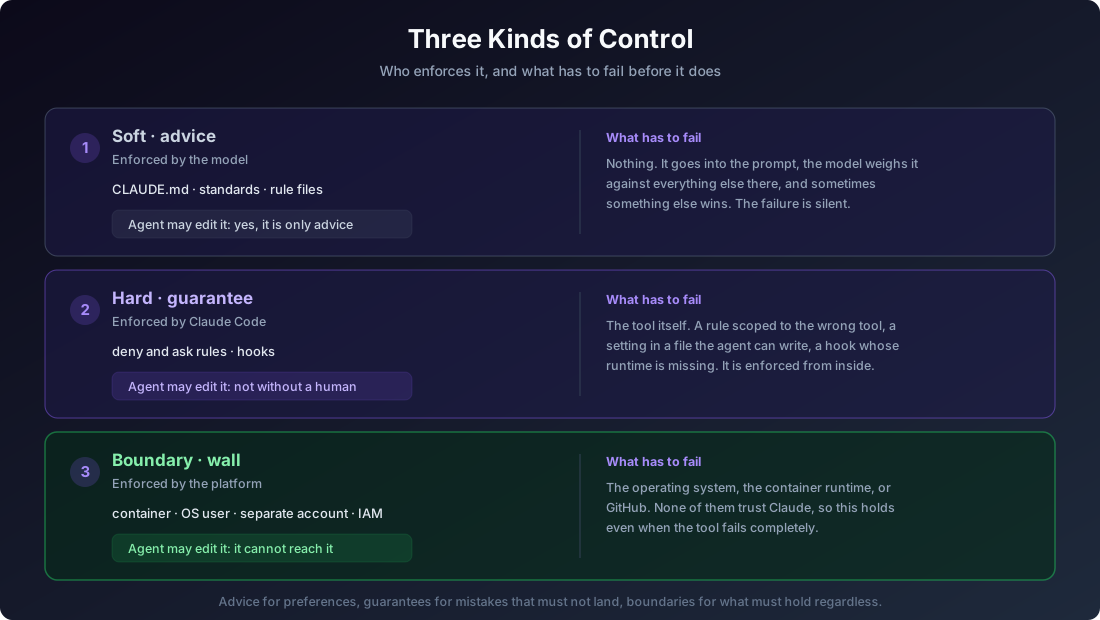
| Kind | Enforced by | What it is | May the agent edit it? |
|---|---|---|---|
| Soft | The model | CLAUDE.md, rules, standards |
Yes. It is advice, and bad advice is caught in review |
| Hard | Claude Code | deny and ask permissions, hooks |
Not without a human |
| Boundary | The platform | Container, OS user, separate account, IAM | It cannot reach it |
Soft controls are context. The files under standards/, your CLAUDE.md, any rule file. They are put in front of the model and it usually follows them. Nothing stops it when it does not. Because they are only advice, letting an agent edit them is fine: the worst case is worse advice.
Hard controls are enforced by the harness. A PreToolUse hook can block a tool call. A deny rule refuses it. An ask rule forces a human prompt. The model gets no vote. These are real guarantees, which is exactly why an agent must not be able to quietly remove one.
Boundary controls are enforced by something that does not trust Claude at all. The operating system, the container runtime, GitHub, your cloud provider. They hold even if the agent escapes the harness completely.
The rule of thumb, which is the whole post in one sentence:
An agent may rewrite the advice. It may not quietly remove the in-tool guarantee. And the guarantees that must hold no matter what live outside the tool entirely.
Match the control to the stakes. Advice for preferences. Hard controls for mistakes that must not land. Boundaries for anything where a failure of the tool itself would be unacceptable.
Where Most Setups Start
Almost everyone begins with CLAUDE.md, and that is the right first move. It is quick, it is readable, and it genuinely improves behaviour. Instructions in it shape what the agent tries to do.
The limit is not that it is weak. The limit is that its failure is silent. When an instruction is skipped, nothing tells you. You notice it later as the agent behaving unlike itself, which is a much harder thing to debug than an error message.
So the question worth asking of every rule you have written is simply: if this is ignored tonight, at 2am, with nobody watching, what happens? If the answer is “not much”, leave it as advice. If the answer is worse than that, it needs to move down the table.
Hardening the Machine You Are On
The first practical step costs nothing and applies wherever the agent runs. It is a permissions baseline for your workstation, published as settings.safety.json. Merge it into the permissions block of your own ~/.claude/settings.json. Do not copy the file over the top, or you will lose everything else in there.
It sets four things.
Auto mode by default. Rather than approving every tool call, auto mode puts practical safeguards between the agent and your machine, and slows down or stops actions that put you at risk.
Reading secrets is denied. .env files, private keys, certificates, keystores, and the on-disk credential stores for SSH, AWS, Azure, gcloud, Kubernetes, Docker, GPG, npm, and Claude Code itself.
Writing them is denied too. Every read deny is mirrored by a write deny, because clobbering a credential is as damaging as reading one. An overwritten authorized_keys is a backdoor. A rewritten ~/.aws/credentials redirects your cloud calls.
The agent cannot edit its own settings. This is the rule that keeps the other three honest. Without it, an agent in auto mode can delete the deny rules and then proceed as it likes.
Two details in that list are worth knowing, because both are easy to get wrong.
The first is that a plain path in a permission rule resolves relative to the settings file it was written in, not to your project. A deny on Read(/secrets/**) in user settings protects ~/.claude/secrets, and nothing at all in the repo you are working on. To write a rule in user settings that reaches inside every project, use the absolute form: Read(//**/secrets/**).
The second is that this baseline is porous by design, and you should treat it that way. Read(**/*.pem) blocks the Read tool. head, less, xxd, bat, and python -c "open(...)" all read the same file through Bash. You can chase those with more rules and you will not win. Prefix denies stop honest mistakes. They do not stop a determined path, and the fix for that is not more rules.
The Boundary That Does Not Depend on Rules
The fix is containment. This is layer one from the first post, made runnable: @lekman/claude-docker.
npx @lekman/claude-docker PROJ-123One command starts a container holding one repository, on one branch, cloned by the container itself over SSH using a key that belongs to a separate account. Nothing else of yours is mounted. Not your working copy, not your other repositories, not your SSH agent, not your ~/.claude, not your shell history, not your cloud credentials.
Run it with no task at all and it checks the setup, then starts on whatever repository you are standing in.
Everything below follows from one decision: if the container is the boundary, then the things that make the boundary real must live where the agent cannot touch them.
The permission mode is auto, and bypass is disabled. Bypassing permissions is tempting for a long unattended run, and it is the wrong trade here. Bypass mode skips prompts for writes to .claude, .git, and several other directories, which is precisely what you are trying to protect. So it is turned off in a way that cannot be turned back on from inside.
The rules are managed settings, not user settings. This is the part that took the longest to get right. The checkout has to be writable, because writing to it is the work. That means a project-level settings file is always within the agent’s reach, and project settings outrank user settings. Managed settings sit at the top of the precedence order and cannot be overridden by anything. The file is owned by root, in a container that runs as an unprivileged user, and mounted read-only. It stays an ordinary file on your machine that you edit, diff, and commit.
Two keys in it are only read from managed settings, and they do the heavy lifting:
allowManagedPermissionRulesOnlymeans user and project settings cannot define permission rules at all. A rule written inside the checkout is never read.allowManagedHooksOnlymeans a cloned repository cannot register hooks.
That second one closes a path that is easy to miss. Without it, any repository you clone can ship a .claude/settings.json that registers a PreToolUse hook, and that hook runs a shell command on every tool call, in a container you are not watching. If you take one configuration idea from this post, take that one.
The identity is a separate account. This is layer two, and it is the step nobody can do for you. An agent can push anywhere the key it holds can reach, so a key on your own account makes the container a formality.
The tool walks you through it and checks the part you cannot easily check yourself. GitHub answers ssh -T with the account name a key belongs to, so it reads the account off GitHub rather than asking you to remember, and it compares that against the accounts you are signed in to on the machine. If they match, it refuses by default.
claude-docker --setup-keyKeys held in an agent, such as 1Password’s, are not offered, because only the public half is on disk and a container needs the private half as a file. That is also why the SSH agent is never forwarded: a forwarded agent cannot be scoped to one repository.
Your standing instructions still travel. Soft controls are still worth having, and a container is where they quietly disappear. If your ~/.claude/CLAUDE.md imports standards from a repository by absolute path, that path does not exist inside the container and the import resolves to nothing. Point the tool at the directory and it is mounted read-only, so the imports resolve and the container reads what the repository currently says.
Narrowing What Can Leave
The container protects the rest of your machine. It does not protect the contents of the task, because the network is open and the agent needs it.
For a second, inner boundary, Claude Code’s sandbox enforces a domain allowlist at the operating system level, so it holds regardless of what the model decided to run. It ships switched off and pre-filled, so turning it on is a one line change.
Three things to know before you rely on it:
- It covers Bash commands and their child processes.
WebFetchand MCP servers follow permission rules instead, so an allowlist here does not constrain them. Closing those needs a proxy. network.strictAllowlistis what makes it deny. Without it the sandbox prompts for an unlisted host, which is no use in a run nobody is watching.- A broad entry such as
github.comis a plausible route out. The proxy does not inspect TLS by default.
What This Does Not Cover
Knowing where a control fails is part of the control, so be clear about the edges.
The network is open. A prompt-injected agent can send anything inside the container out. The boundary protects your machine, not the task.
The dedicated account is a real account. Anything it can reach, the agent can reach. Scope it to the repositories you actually want touched, and that scoping is layer three doing its job.
A container is not a virtual machine. It is a strong boundary against accident and a good one against misuse. Kernel level escapes exist. For a genuinely hostile workload, use a disposable VM.
Hooks shift left, they are not the last line. A hook that inspects shell commands catches the ordinary cases. Shell is not reliably parseable, and there is always another way to write the same command. What holds is that a rule written in the checkout is never read in the first place.
Where to Start
In order, because they are not equally valuable.
- Write down which of your controls are advice. Most people find they have more than they expected. That is not a failure, it is just useful to know.
- Apply the machine baseline. Deny reads and writes of credential stores, and deny the agent editing its own settings. It costs nothing and applies everywhere.
- Move unattended work into a container. One repository, one branch, and nothing else of yours. This is worth more than every rule above it combined.
- Give it a separate account. The container without this is a formality, and it is the one manual step.
- Scope that account down. Only the repositories it should touch.
- Turn on the sandbox if egress matters, and remember it covers Bash only.
Every layer here assumes the one above it will eventually fail. That is the point. Defence in depth does not need any layer to be perfect, it needs the failure of one to land on the next one instead of on you.
Next in the Series
This post answered one question: what can the agent reach? There is a second, and confusing the two is the usual mistake. Running Claude in your own AWS account decides what data leaves your control and says nothing about what the agent can do to your laptop. Putting it in a container is the reverse. Most setups need both, and where inference runs is the next post.
After that: what changes when agents run unattended in CI, and what agent-driven development means for the software supply chain.

25 years building secure digital solutions for regulated and modern teams.